Context7 Guide
Get enhanced AI responses with technical documentation and best practices automatically included.
What is Context7?
Context7 is an intelligent feature that automatically enhances your AI conversations by providing relevant technical knowledge and best practices. When you ask questions about programming, development, or technical topics, Context7 enriches the AI's response with up-to-date documentation and expert recommendations.
✨ Transform basic answers into production-ready solutions with Context7!
How Context7 Works
❌ Without Context7
- • Basic examples with minimal explanation
- • Generic code without best practices
- • Limited context about performance
- • No error handling guidance
✅ With Context7
- • Production-ready code examples
- • Current best practices included
- • Performance optimizations explained
- • Comprehensive error handling
Visual Comparison
❌ Without Context7 (Disabled)
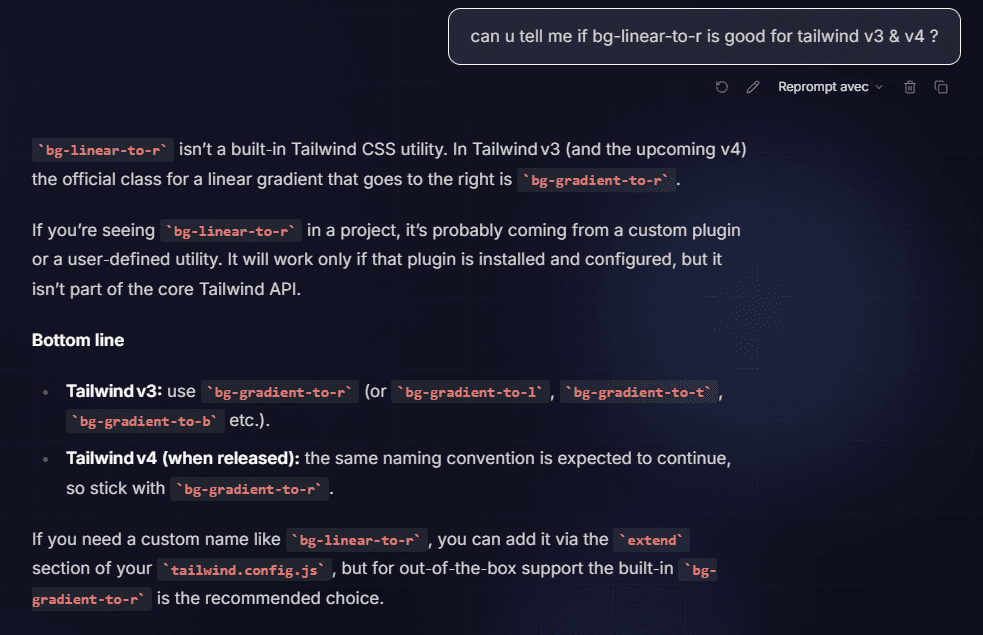
The AI uses its training knowledge which might be outdated, for example confusing syntaxes between different framework versions.
✅ With Context7 (Enabled)
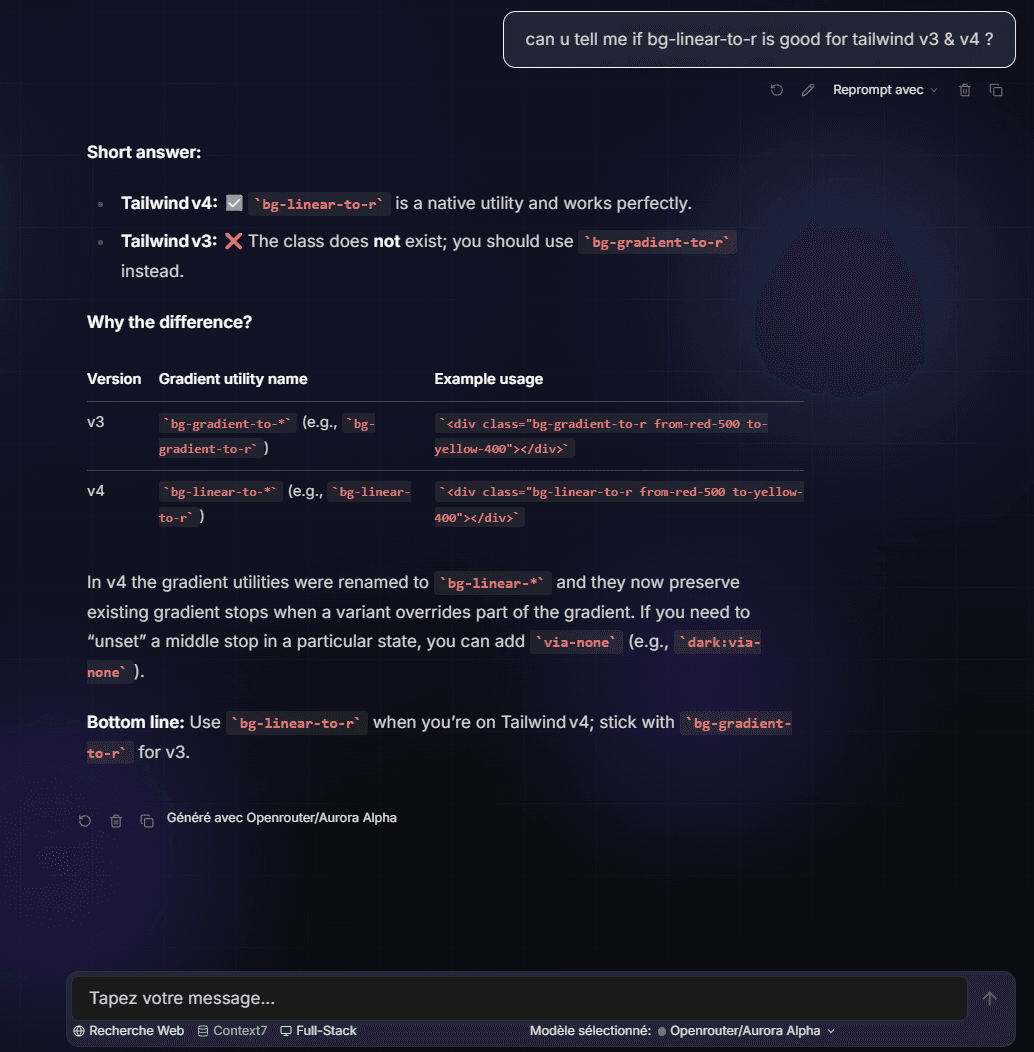
The AI instantly retrieves the latest official documentation (v3 vs v4), ensuring accurate responses.
Concrete Example: Tailwind CSS v3 vs v4
User Question
"Question: "How to make a gradient to the right?""
bg-linear-to-rbg-linear-to-rThanks to Context7, the AI knows that Tailwind v4 uses bg-linear-to-r while v3 uses bg-gradient-to-r.
Getting Started
Enable Context7
Navigate to Settings → MCP Servers → Add New Server → Choose Context7
Start Asking Questions
Once enabled, Context7 works automatically. Ask your technical questions as usual!
Enjoy Enhanced Responses
Get comprehensive, production-ready solutions with best practices included.
Supported Technologies
Context7 provides enhanced responses for:
Benefits for Users
Faster Development
Get production-ready code examples instead of basic tutorials.
Stay Current
Receive answers based on the latest documentation and best practices.
Better Code Quality
Learn proper patterns, error handling, and performance optimization.
Comprehensive Solutions
Get complete examples that address real-world development needs.
Automatic Enhancement
No need to search documentation separately – it's integrated into your AI responses.
Privacy & Data
- Context7 only processes your questions to find relevant documentation.
- No personal data is stored or shared with external services.
- All enhanced responses are generated locally in your chat session.
- You can disable Context7 at any time in your settings.
Your privacy is important. Context7 is designed to protect your data.
Advanced Features
Multiple Technology Questions
Context7 can handle questions that involve multiple technologies, providing integrated solutions:
- "How do I connect a React frontend to a Node.js API with TypeScript?"
- "What's the best way to deploy a Next.js app with a PostgreSQL database?"
Best Practices Integration
Every enhanced response includes valuable insights to help you write better code:
- Current industry best practices
- Performance considerations
- Security recommendations
- Testing approaches
Example Questions That Work Great
"How do I implement authentication in Next.js with TypeScript?"
"What's the best way to handle form validation in React?"
"How do I optimize database queries with Prisma?"
"What are the best practices for error handling in Node.js APIs?"
"How do I implement responsive design with Tailwind CSS?"
Tips for Best Results
✅ Do:
- • Ask specific questions about technologies you're using
- • Mention the framework or library you're working with
- • Ask about best practices and production patterns
- • Request examples for real-world scenarios
❌ Avoid:
- • Very general questions without technical context
- • Questions unrelated to software development
- • Asking for deprecated or outdated information
- • Overly broad or vague requests
Troubleshooting
Context7 Not Working?
- Check that the server status shows "Connected" in Settings
- Try asking a specific technical question (e.g., "How do I use React hooks?")
- Refresh your browser and try again
Getting Generic Responses?
- Make sure your question mentions specific technologies
- Be specific about what you're trying to build
- Context7 works best with development-related questions
Need Help?
- Check the server status in Settings → MCP Servers
- Try disconnecting and reconnecting the Context7 server
- Contact support if problems persist